
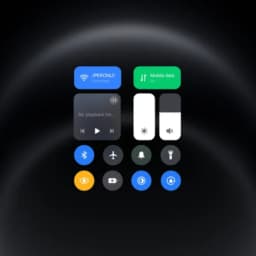
Screenshots
About Mi Control Center
Transform your Android control center with Mi Control Center, the customizable quick-access hub that puts iOS-inspired elegance at your fingertips. Designed for users who want to streamline device management and personalize their Android experience, this app delivers an intuitive interface that makes controlling your device faster and more enjoyable than ever.
Effortless customization lies at the heart of Mi Control Center. Rather than settling for a standard control panel, you gain the freedom to arrange and organize quick settings exactly as you prefer. Access your camera, clock, and essential tools in seconds with layouts inspired by iOS 17 design. Choose from multiple attractive design themes that reflect your personal style, and switch between them instantly to match your mood or workflow. Every element has been positioned to minimize taps and maximize efficiency—whether you're toggling settings, launching your favorite apps, or adjusting brightness on the fly.
Streamlined navigation and accessibility are built into every interaction. The app's thoughtfully designed interface ensures that both quick adjustments and deeper settings are within immediate reach. Quick access to frequently used functions means you spend less time hunting through menus and more time doing what matters. The accessibility-friendly design accommodates different user preferences, making device control intuitive for everyone.
Beyond raw functionality, Mi Control Center combines elegant aesthetics with practical power. Its iOS-style layouts bring a modern, premium feel to your Android device without sacrificing the flexibility Android users love. Customize your control center to match your unique workflow—organize tiles your way, choose the visual style that appeals to you, and create a control hub that feels genuinely yours. This balance of form and function makes daily device management feel less like a chore and more like a pleasure.
Whether you're a power user seeking maximum control or someone who simply wants their device to feel more polished and responsive, Mi Control Center delivers. The streamlined controls remove friction from everyday tasks, while the design options ensure your device reflects your personality. Experience a smarter, more responsive way to manage your Android phone with Mi Control Center and discover how a well-designed control panel can transform your entire device experience.
Requirements: Android 7.0 or higher
Pros & Cons
Pros
- Fully customizable quick-access tiles organized your way
- iOS-inspired design themes available to personalize interface
- Faster access to frequently used functions and settings
- Accessibility-friendly design accommodates different user preferences
Cons
- Another launcher app competing for home screen real estate
- May introduce redundancy if your device already has quick settings
- Potential battery impact from running additional control center service
- Customization options could feel overwhelming for casual users
Frequently asked questions about Mi Control Center
Is Mi Control Center safe to download?
The Mi Control Center file on Unstore was scanned for malware on May 20, 2026. The scan found no threats and gave it a risk score of 20/100 (lower is safer).
What are the system requirements for Mi Control Center?
Mi Control Center runs on Android. The download size is 18.0 MB.
What is the latest version of Mi Control Center?
The latest version of Mi Control Center on Unstore is 11. It was last updated on May 25, 2026.
Who develops Mi Control Center?
Mi Control Center is developed by Nucleus Apps Studio.
Related Apps

Microsoft PowerToys
Windows utilities and productivity tools — enhance your workflow with system tools, window management, and file preview features.

Windows Essentials 2012
Email, messaging, photo editing, video creation, and cloud storage—Windows Essentials 2012 includes all the productivity tools you need.

Free Download Manager
Download manager that speeds up transfers, organizes files by type, and syncs with Firefox and Chrome.

HWiNFO
Hardware monitoring for Windows—track CPU temp, GPU load, fan speed, voltage in real time.

TransMac
Read Mac drives and DMG files on Windows. Access APFS/HFS+ storage and create disk images.

TestDisk & PhotoRec
Recover lost files and repair disk partitions — free open-source data recovery tool for Windows.
Latest Articles

Play a free Poly Bridge-style bridge builder in your browser (no download)
Nov 14, 2026

Play a free Balatro-style poker roguelike in your browser (no download)
Nov 14, 2026

GarageBand for Android or Chromebook? A free music studio in your browser
Nov 14, 2026

FlipaClip for PC or Chromebook? We built a free animation maker that runs in your browser
Nov 14, 2026

Play a free Color Ball Sort Puzzle-style game in your browser (no download)
Oct 6, 2026